


AI in CRM is most useful when it helps a colleague understand a customer, prepare a response or spot a missed next step. For a UK service firm, the first test should be a narrow, visible workflow with a clear owner.
The quick answer
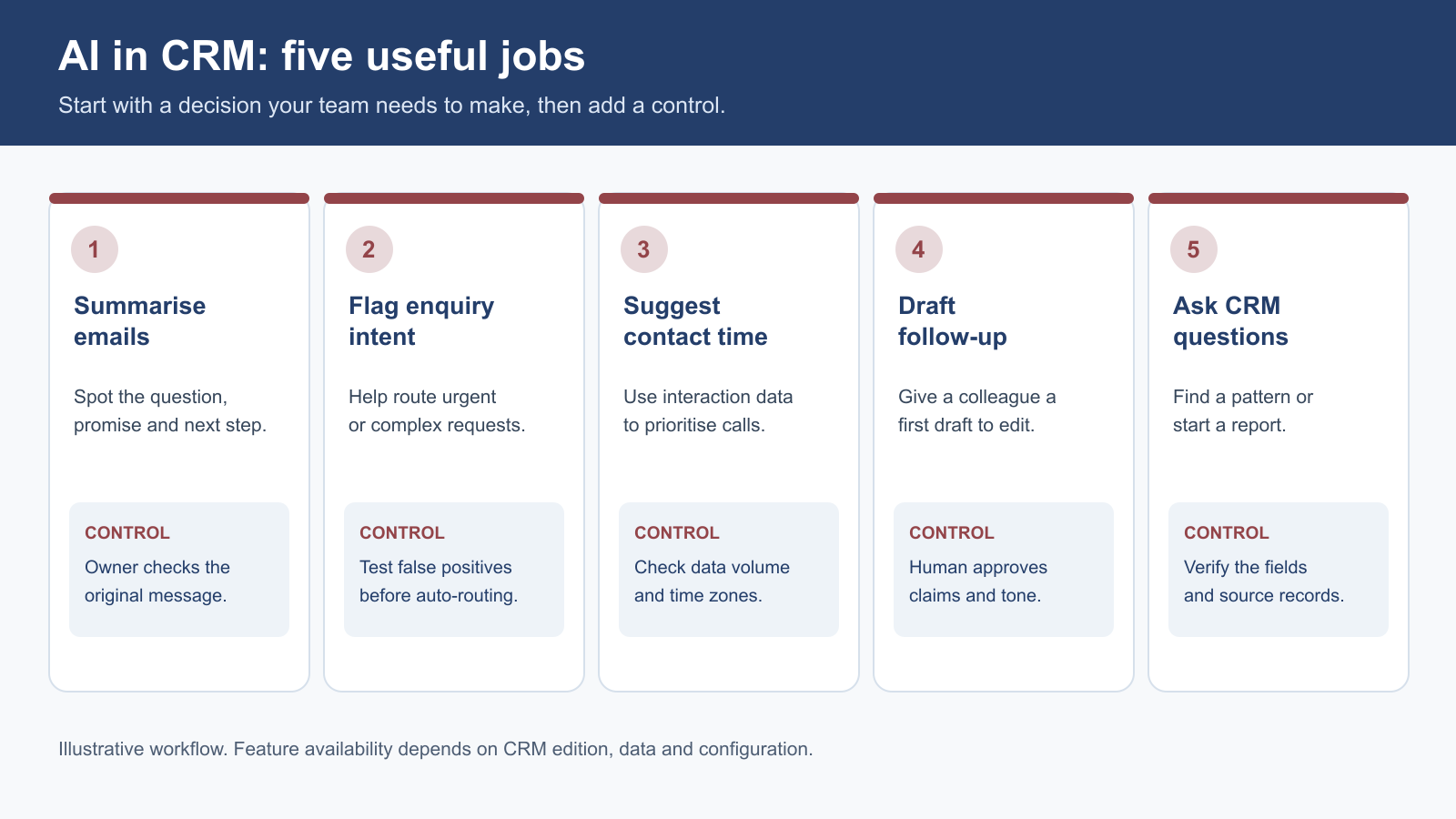
Start with five bounded uses: summarise a conversation, identify an email's purpose, draft a follow-up, suggest a contact time, and help build a report or workflow. Keep the source record visible, approve customer-facing content and measure whether the task gets quicker without adding errors. Availability varies by edition, data centre and account history.
| First question | A useful answer before you switch AI on |
|---|---|
| What job is slow? | A named task, such as reading a long enquiry thread before a call. |
| What may the tool use? | Only the CRM records and fields needed for that task. |
| Who checks the output? | The person accountable for the customer or process. |
| What happens when it is wrong? | A simple route to correct the record or handle the case manually. |
| How will we judge it? | Time, completion, quality and customer outcomes against a baseline. |
Why start small?
The Office for National Statistics reported in July 2026 that self-reported AI use among UK businesses with 10 or more employees had risen from around 12% in late 2023 to around 35% in June 2026. The same analysis reported 28% among businesses with 0 to 9 employees in June 2026. These are measures of reported use of at least one AI technology, across businesses; they do not show that any particular CRM workflow produces a return.
The ONS also observed that “AI adoption to date has been relatively shallow among UK businesses with 10 or more employees”. Test an actual task rather than assume an AI feature is already changing work.
1. Turn a long email thread into a call brief
The situation. A consultant takes over an account and needs to find the original request, an agreed date and an unresolved concern scattered across several emails.
The AI-assisted step. Zoho says Zia can summarise individual emails and threads. Use the summary as a reading aid before the call, then open the underlying messages to confirm the facts that matter. A good brief separates what the client requested, what your team promised and what still needs a decision.
The check. Do not treat a summary as the contractual record. Verify dates, fees, scope changes and complaints in the original message. Correct misleading CRM notes rather than copying them into another system.
Measure: preparation time and missed actions in sampled threads.
2. Spot which incoming messages need attention
The situation. A shared inbox contains quote requests, routine questions and complaints. The same person reading every message in arrival order can delay urgent service issues.
The AI-assisted step. Zoho's email-intent guidance describes categorising a customer's email as a query, request or complaint. That label can help a colleague decide which queue or owner should review it first. It is a suggestion from the message content, not proof that the customer intended that category.
The check. Sample results and record misclassifications. A complaint labelled as a general question needs a correction route. Put an authorised person in the path of consequential decisions. The ICO's AI guidance says human reviewers must be able to challenge an AI recommendation.
Measure: time to the right response and wrong-queue rate.
3. Draft a follow-up, then make it sound like a person
The situation. After a discovery call, a consultant needs to send a clear recap of the client's problem, agreed next step and date. Drafting from scratch is repetitive; sending a generic message is not reassuring.
The AI-assisted step. Zoho describes AI-assisted email drafting and editing within CRM. Give it a short, approved instruction: the audience, purpose, tone and confirmed facts. Ask for a concise draft that makes one next action obvious.
The check. Compare the draft with the meeting notes. Check names, dates, prices and attachments. Do not imply a proposal is approved or a contract has changed. If the message becomes promotional, check the ICO's current electronic-mail marketing guidance.
Measure: drafting time, corrections and whether the promised action happened.
Suggested prompt structure: “Draft a 120-word follow-up for the account owner to review. Use only these confirmed points: [three points]. State the action, owner and date. Do not add a price, promise or outcome.”
That is a template for an approved environment, not a reason to paste customer information into an unassessed tool.
4. Choose a more useful time to follow up
The situation. A team keeps sending reminders at a convenient time for the sender, while a prospect usually replies at another time.
The AI-assisted step. Zoho's Best Time to Contact feature uses recorded interactions, such as email opens or calls, to suggest when an individual contact may be reachable. Treat this as a scheduling suggestion. A prospect can still have different preferences from the pattern in their history.
The check. Honour an explicit preference such as “please call after 4 pm” ahead of an inferred one. Zoho says suggestions need qualifying contact activity. Email scheduling is edition-dependent, so check the current feature guide.
Measure: contact rate, response time and complaints.
5. Ask for the first version of a report or workflow
The situation. A manager wants to see open deals with no next action, but the report is delayed because nobody has defined the fields and filters. Or an administrator needs a rule that assigns a review task when a deal reaches a specified stage.
The AI-assisted step. Zoho's Ask Zia guidance describes building reports and configuring workflows from conversational requests. A manager can state the business question; an administrator can then inspect the proposed fields, criteria, recipients and actions. This is configuration assistance, not permission to publish a rule unseen.
The check. Test a normal case, a missing owner, a duplicate and an excluded case. Confirm alert recipients and repeat behaviour. Have an administrator approve and document the rule.
Measure: time to a useful report and false alerts.
Check the prerequisites before promising a result
Zoho lists Ask Zia for Professional and higher Zoho CRM editions in supported US, EU and India data centres. Its email-intelligence features are also listed for Professional and higher editions. Other capabilities, permissions and usage limits vary. Confirm the features available in the customer's live account before putting them in a proposal.
Prediction is a separate case. Zoho's field-prediction guidance says the algorithm needs at least 200 records matching its training criteria. A small service firm may not have the volume or clean history to support it. Begin with useful summaries, classifications or drafts if those fit the work; revisit prediction only when the data and decision justify it.
Run a four-week pilot with a visible control
Choose one task and record a baseline from representative cases. Define approved users and data, expected output, reviewer and error criteria. In week one, test varied examples without unnecessary customer data. In weeks two and three, let a small team use it while recording time and corrections. In week four, decide whether to adjust, extend or stop.
The ICO's data-minimisation principle supports using only personal information needed for the purpose. Decide who can access it and how it is corrected or removed. Zoho describes CRM permissions around AI connections; the business must configure them for its use.
AI in CRM FAQs
Is AI in CRM useful for a business with fewer than ten staff?
It can be, particularly for drafting or summarising a repeated task. The benefit depends on how often the task occurs, the available feature set and the effort of checking output. Forecasting or prediction features may need more historical data than a very small account holds.
Can AI send follow-up emails on its own?
Some CRM and automation features can send messages after a configured trigger. For a first pilot, require an owner to review customer-facing drafts, especially where scope, price, complaint handling or personal information is involved.
Does Zia need all our customer data?
No workflow should start with that assumption. Define the purpose, fields, users and retention before enabling a feature or connecting another tool. Review the supplier's current configuration and terms for the particular capability.
Will AI improve lead conversion?
That is a hypothesis to test, not a guaranteed result. Check the quality of the first response and whether the next step was completed before attributing any sales change to AI.
Should we start with lead scoring?
Only if the team has sufficient, consistent historical data and a genuine decision that scoring would improve. Zoho documents a minimum training-record threshold for its field predictions. Many firms will get more immediate value from clear ownership and reliable follow-up.
Sources and fact checks
- ONS, Artificial intelligence in UK businesses: 2023 to 2026 — release date, populations and AI adoption figures.
- Zoho CRM, Zia for Emails — summaries, intent and edition availability.
- Zoho CRM, Ask Zia — report and workflow capabilities, availability.
- Zoho CRM, Best Time to Contact — interaction-history prerequisites.
- Zoho CRM, Zia Field Prediction — minimum eligible records.
- ICO, data minimisation and human oversight in AI systems — UK data-protection context.
This article offers general operational information, not legal advice. Check current product availability and the data-protection requirements for your use case before deploying a workflow.