


Winning a deal starts delivery. A new client should not have to repeat their brief because sales notes stayed in somebody's inbox. A good client onboarding process makes the agreed scope, owner, first actions and open questions visible in one place.
The quick answer
Use the Closed Won stage to start a controlled handover: confirm scope, assign a delivery owner, welcome the client, book a kick-off, track the first milestone and check in within 30 days. Automate routine tasks and reminders; give disputed scope and missing information to a named person.
| Moment | Client needs to know | Your team needs to know |
|---|---|---|
| Deal won | Who will take over and what happens next. | What was sold, promised and still unresolved. |
| First working days | What information to provide and when work begins. | Whether access, documents and approvals are complete. |
| First delivery milestone | What has been done and what is next. | Whether the work matches scope and timetable. |
| Day 30 | Whether the service is on track and who to contact. | Friction, outstanding issues and next improvement. |
Make Closed Won a handover, not just a reporting label
Zoho's deal automation guide says Closed Won can trigger a thank-you email, an onboarding task and a handoff to an account manager. A trigger alone cannot tell the delivery team what the client expects.
Zoho's onboarding team guidance puts the point clearly: “Onboarding teams are the bridge between sales and customer success”. Give that bridge an owner and the information to cross it.
Before a deal can be handed over, agree the minimum record:
- The scope: purchased service, signed proposal or order, exclusions and promised deliverables.
- The people: client sponsor, day-to-day contact, delivery owner and any specialist needed.
- The dates: proposed start, first meeting, dependencies and any immovable deadline.
- The commercial handoff: purchase order, billing contact and who confirms invoice timing.
- The open questions: missing files, access, approvals, risks and anything said verbally that still needs written confirmation.
Link to approved documents rather than copying them into more fields. Decide which facts are mandatory and which exceptions need a person. Zoho Blueprint can guide stages and require fields or checklists at transitions, subject to edition.
A practical first-30-days sequence
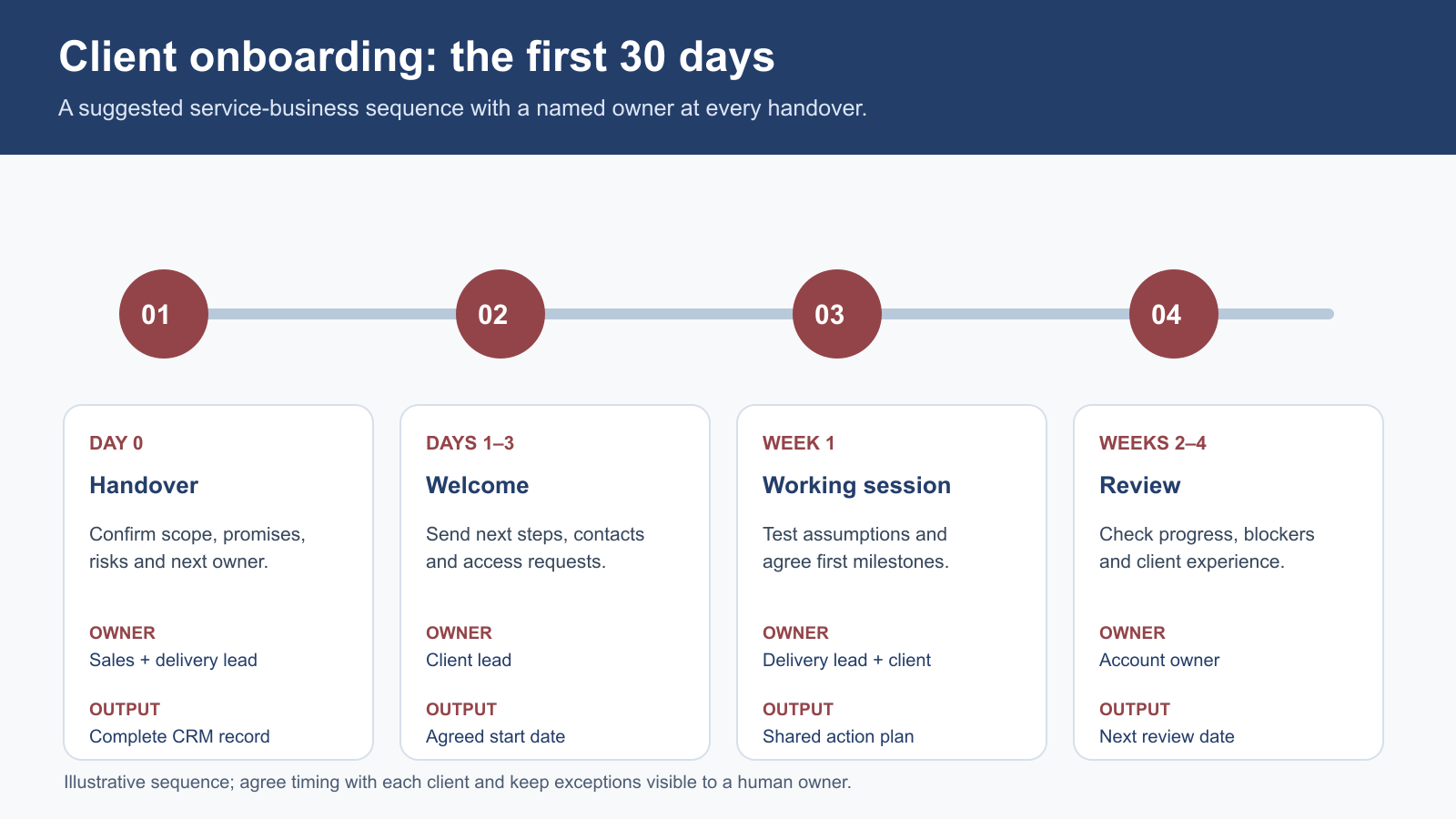
This is a suggested process. Adjust dates for each engagement; keep a trigger, owner, outcome and exception route at every step.
| When | Trigger and owner | Action and proof | Exception route |
|---|---|---|---|
| Day 0 | Deal set to Closed Won; sales owner | Check signed scope, contact and agreed start date. Create onboarding handover. | Missing agreement or unclear scope goes to sales owner before any client promise. |
| Day 1 | Handover accepted; delivery owner | Review the deal, acknowledge ownership and send a service-focused welcome message. | If no delivery owner is available, alert operations and hold the client message. |
| Days 2–5 | Welcome sent; project lead | Book kick-off, request only necessary documents and assign internal setup tasks. | Record missing access or documents with an owner and due date. |
| Days 5–10 | Kick-off held; project lead | Confirm outcomes, milestones, communication route and decision makers in writing. | Escalate changes to price or scope for approval rather than silently altering the plan. |
| Days 10–20 | First milestone due; delivery owner | Share a progress update and confirm the first deliverable or agreed next action. | Flag blockers early and revise dates with the client. |
| By day 30 | Check-in due; account owner | Ask whether expectations, communication and delivery match what was agreed. | Assign any issue to an owner and follow it through to resolution. |
Tie dates to events or milestones; avoid reminders nobody owns.
What the client actually receives
A welcome message should identify the lead contact, restate the service, give the next date, request necessary information and provide a route for questions.
Suggested service email outline
“Thank you for confirming [service]. [Name] will lead the work. Our first step is [action] on [date]. Please send [specific item] by [date] through [approved route]. If any part of the agreed scope or timing looks different from your understanding, reply to this message before we begin.”
This is a writing example, not a customer quote. Do not insert an unapproved start date. Routine service messages differ from promotional email under the ICO's PECR guidance; review the marketing rules if the sequence includes offers.
An example: a small facilities consultancy
Hypothetical example. A facilities consultancy wins a six-month engagement with a UK property manager: site review, findings report and monthly meetings. When the deal is marked Closed Won, the CRM checks for the approved proposal, site contact, billing contact and proposed kick-off date, then creates a delivery handover task.
The delivery lead notices that site access is unresolved. They ask the client to confirm it rather than implying the visit is booked. The welcome email introduces the lead and proposes a kick-off. At that meeting, the team confirms the report deadline and approver. On day 30, the account owner checks whether the first report and communication met expectations.
The CRM records the issue, owner and answer; it does not resolve the contract question.
Design the exceptions before the happy path goes live
Test awkward cases: two projects for one customer; an attachment the delivery user cannot see; a stage changed twice; an absent manager; a client asking to start before a prerequisite is complete.
Give each exception a holding state and owner. An internal task can be created immediately, while the welcome message waits for scope and date confirmation. Alert operations if a handover remains unaccepted. These are design recommendations, not default Zoho settings.
Keep access proportionate. Delivery may need the agreement but not every pre-sale note. The ICO's data-minimisation guidance supports using only necessary personal information. Review document access and retention; the ICO sets no universal retention period.
Measure the handover, not just the emails
Examine recent won deals and record where delays began. After launch, review four measures:
| Measure | What it reveals | Guard against a false signal |
|---|---|---|
| Time from win to named delivery owner | Whether responsibility moves promptly. | An assignment alone does not mean the owner accepted it. |
| Handover completeness | Whether scope, dates, contacts and open items were captured. | Count verified information, not filled fields. |
| Time to first agreed milestone | Whether setup enables useful work. | Adjust for projects with different complexity. |
| Client issue and rework rate | Whether expectations were understood. | Review issue severity and cause, not only volume. |
At the day-30 check-in, ask: “Was there anything you had to explain twice?” Review the answer with sales and delivery, then simplify rules that add work without improving the experience.
Client onboarding process FAQs
When should onboarding begin?
As soon as the agreement is genuinely won and the minimum handover details are ready. You can create internal tasks immediately while delaying an external promise until the delivery owner confirms it.
Should the CRM or a project tool own onboarding?
Use the CRM to show the customer relationship, agreement, owner, milestones and handover status. A project tool may manage detailed delivery work. Choose one source for each fact and connect the systems so the account owner can see progress.
Do we need a different process for every service?
Usually keep a common spine: owner, scope, kick-off, first milestone, check-in. Add service-specific steps only where the work, risk or evidence genuinely differs.
Can we send the welcome email automatically?
Zoho supports triggered emails, but the safe choice depends on your data. Begin with a reviewed draft or a send gate if dates, scope or contacts are often incomplete. Test duplicates and stage reversals.
What if the client is slow to provide information?
Show the dependency, date and owner in the CRM, send a clear request and agree the effect on the timetable. Do not report the project as “on track” merely because your internal tasks are complete.
Sources and fact checks
- Zoho One, Deal Automation Guide in Zoho One using Zoho CRM — Closed Won email, task and post-sale handoff examples.
- Zoho CRM, Onboarding teams on Zoho CRM for Everyone — attributed short quote and cross-team handover context.
- Zoho CRM, Design a Blueprint — process stages, fields, checklists and transition actions.
- ICO, Electronic and telephone marketing — service-message and marketing distinction.
- ICO, Data minimisation and Storage limitation — personal-data scope and retention.
This article offers general operational information, not legal advice. Confirm current Zoho feature availability, your contract terms and applicable data-protection requirements before launch.